
Apple AirTag Stalking: Safety and Accountability
Nov 18, 2026
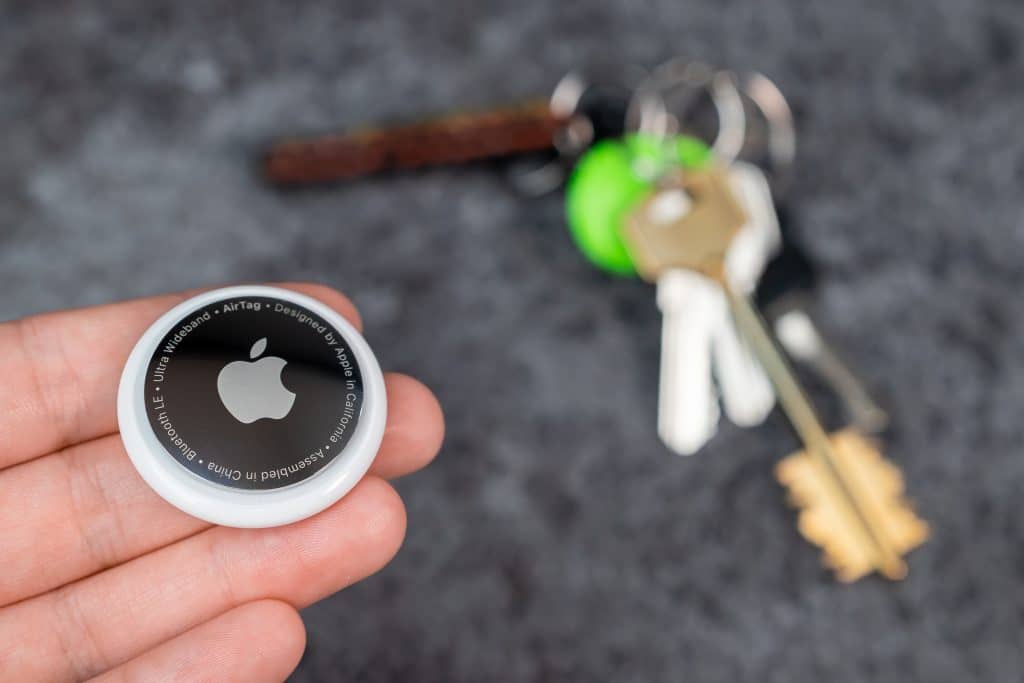
what is an airtag?
An Apple AirTag is a small, coin-sized Bluetooth tracking device designed to help people locate personal belongings such as keys, bags, and luggage. Although AirTags are not designed to facilitate sexual violence, their misuse raises serious concerns at the intersection of technology-facilitated stalking, sexual violence, product liability, and corporate accountability. An individual who secretly tracks another person may use the device to identify their location, monitor their routines, or facilitate unwanted physical contact.
- Were the risks of misuse foreseeable?
- Could reasonable safeguards have reduced those risks?
- What responsibility do manufacturers have to reduce foreseeable harm?
How AirTags Can Be used to track potential victims
How the Technology Works
AirTags do not contain built-in GPS. Instead, they transmit Bluetooth signals that nearby Apple devices can detect through Apple’s Find My network. Those devices anonymously relay the AirTag’s approximate location to the network, allowing its registered owner to see where the tag is located, even when they are nowhere nearby.
Potential for Misuse
Someone seeking to track another person could secretly place an AirTag on a car, in a purse, backpack, coat pocket, or vehicle. If the device travels with that person, its reported locations may reveal their movements, daily routines, frequently visited locations, and other patterns of behavior.
This information can create significant safety concerns, particularly when the tracking is part of an ongoing pattern of stalking, intimidation, or harassment.
how to detect an unknown airtag
Apple and Google have implemented safety features designed to alert individuals when an unknown Bluetooth tracking device appears to be traveling with them.
iPhones can display an alert when an unknown AirTag is detected moving with the user. Depending on the alert, users may be able to view information about the device, locate it, and make it play a sound.
Android Users
Android devices running supported versions of the operating system can receive automatic unknown-tracker alerts. Users can also access manual scanning through Android’s safety settings. Available features and menu options may vary by device and operating system.
A manual scan can identify certain compatible trackers separated from their owners, but it cannot guarantee that every hidden tracking device will be detected.
Android phones running Android 6.0 or later can detect unknown AirTags and other Bluetooth trackers automatically or through a manual scan in Settings > Safety & emergency > Unknown tracker alerts.
Audible Alerts
An AirTag separated from its registered owner may emit a sound after a period of time. However, the sound may be difficult to hear, particularly if the device is concealed.
NFC Scanning
If you locate a physical AirTag, hold an NFC-enabled smartphone near its white side. A notification or webpage may display identifying information, including the AirTag’s serial number and, in some circumstances, partial contact information for its registered owner.
what should you do if you find a hidden airtag?
If you receive an unwanted tracking notification or suspect someone is using an AirTag to monitor your movements, take the situation seriously.
- Prioritize Your Safety
Do not confront the suspected individual. If you believe you are being followed, avoid going home or traveling to another private location where you may be vulnerable. Consider going to a police station, a busy public place, or another secure location.
If you believe you are in immediate danger, call 911.
- Locate and Document the Device
Follow the instructions on your phone to locate the unknown AirTag or make it play a sound, if that feature is available.
If you find a physical device, photograph its location and appearance. Use your phone to scan the AirTag’s white side and access any available identifying information.
Take screenshots of the information displayed, including the serial number. Preserve any unwanted tracking notifications and related communications.
- Contact Law Enforcement
Report the incident to law enforcement, particularly if you suspect stalking, harassment, or threats to your safety.
Provide officers with the AirTag, its serial number, screenshots, and any other relevant evidence. The serial number may help investigators request identifying information from Apple through appropriate legal processes.
- Disable the AirTag
If you determine that an AirTag is tracking you without your consent, you can disable it by following Apple’s instructions for removing its battery.
If it is safe, document the device before making changes. Your immediate safety takes priority over preserving evidence or waiting for law enforcement.
airtags, stalking, and the question of foreseeable harm
Apple AirTags are designed to help people locate lost belongings, not to facilitate stalking, harassment, or sexual violence. Yet their potential misuse raises difficult questions about the responsibilities of technology manufacturers and the protections owed to consumers.
When an inexpensive consumer tracking device is used without consent to identify someone’s location, monitor their routines, or facilitate unwanted physical access, the legal inquiry extends beyond the product’s intended purpose.
It requires examining whether the potential for misuse was reasonably foreseeable, whether practical safeguards were available, and whether the manufacturer took reasonable steps to identify and mitigate those risks.
These questions are particularly important when technology-facilitated stalking becomes part of a broader pattern of intimidation, coercion, or sexual violence.
Ultimately, the issue is not simply how technology works, but how it can be misused, who may be harmed, and what responsibility manufacturers have to anticipate and address foreseeable risks.